Semantic Search
The default search method in DoCube relies on specific keywords. However, semantic search overcomes this limitation: it directly understands the intent of your query, enabling it to accurately find relevant content even when the exact words you used are not present in the results.
For example, if you search for "how to improve work efficiency", the default search might only return documents containing that exact phrase. In contrast, semantic search understands your intent and can return related content such as "time management techniques" or "setting task priorities", even if the phrase "improve work efficiency" is not explicitly mentioned in those documents.
Semantic search relies on AI models to generate text vectors. You need to first configure an AI service provider that supports semantic search.
Go to Settings -> AI Assistant to configure the API Key for the service provider. Alternatively, click here to go directly to the configuration page.
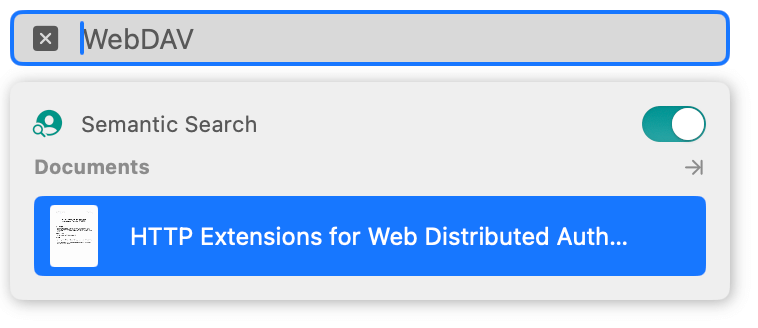
After configuring the AI service provider, a Semantic Search toggle will appear in the search prompt panel (as shown below). Enabling it will initiate a hybrid search, which combines both the default search and semantic search methods, and merges the results from both approaches for presentation.
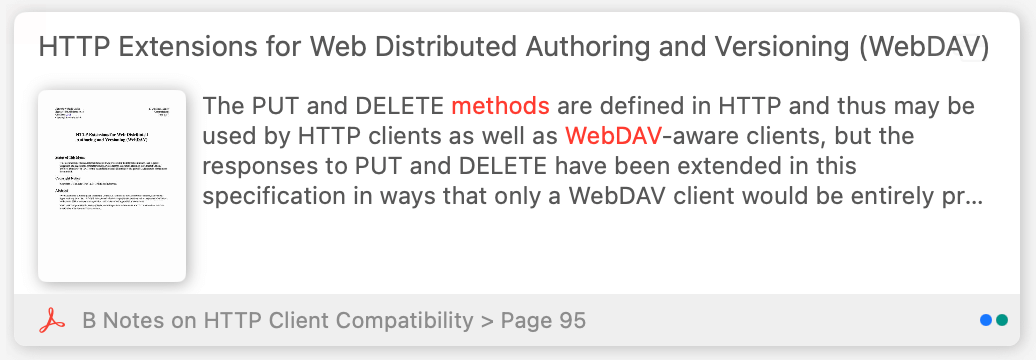
In the hybrid search results list, article cards marked with a blue dot indicate results found via keyword matching, while those marked with a green dot indicate results found via semantic search. An article card displaying both blue and green dots means it was found by both methods, indicating higher relevance.